Alerts and webhooks
Updated
On this page
Alerts turn the dashboard into something that tells you when to look. Rules are per site, checked every five minutes, and carry totals only: nothing about a single visitor.
Note:
On Tidemark Cloud, alerts and webhooks are included with Pro. On Free, the Alerts tab is blurred with an upgrade link, and any rules you created before are paused (not deleted) until you upgrade. Self-hosted installations always have them.
Create an alert
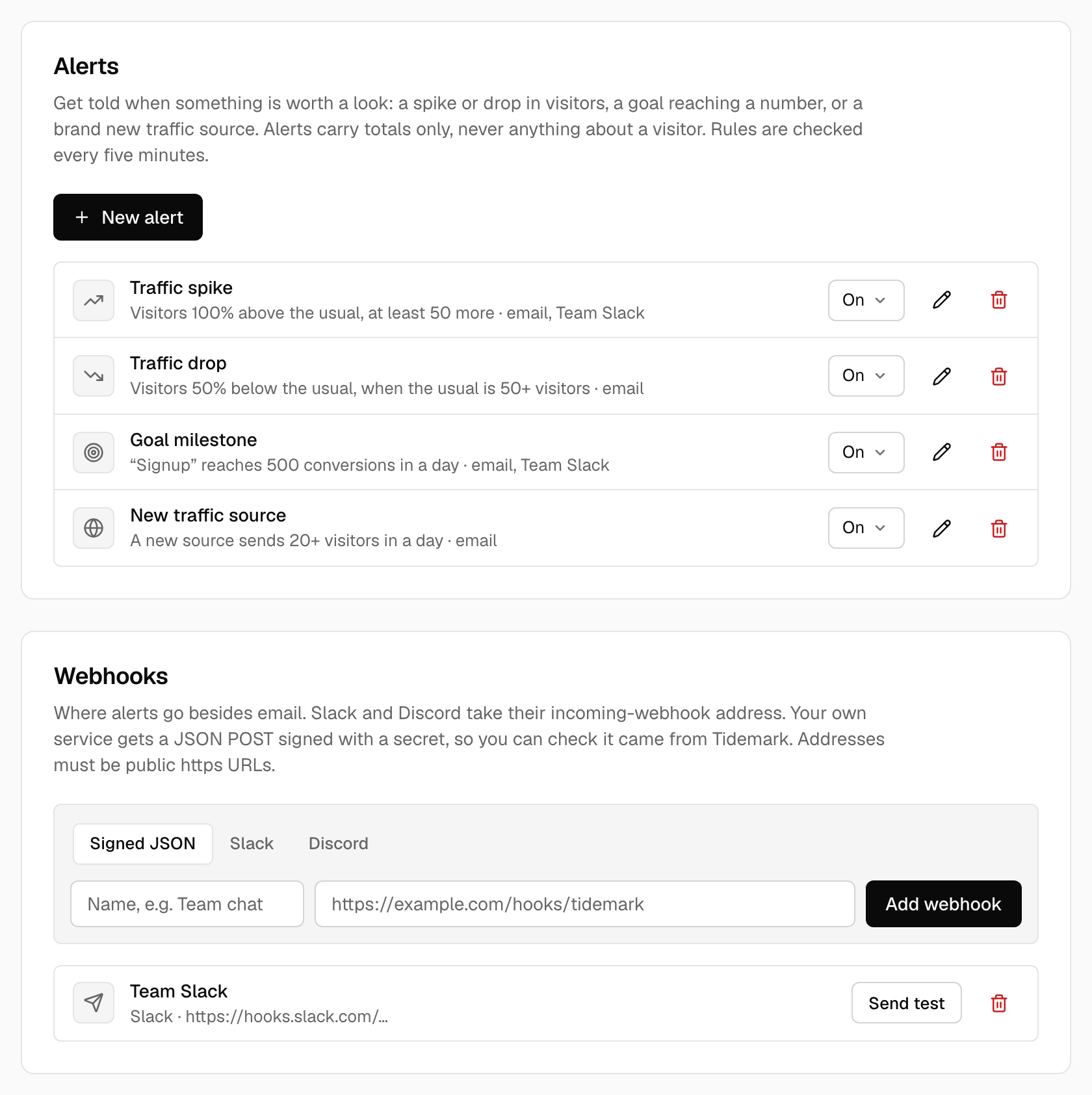
Open Site settings → Alerts, choose New alert, pick when it should fire and where to send it.
| When | It fires when | Settings |
|---|---|---|
| Traffic spike | Visitors so far today are well above the usual for this weekday and time of day. At most once every 6 hours. | Percent above the usual (default 100) and at least this many more visitors (default 50). |
| Traffic drop | Visitors so far today are well below the usual (only after 06:00 site time). At most once every 6 hours. | Percent below the usual (default 50) and the usual must be at least this many visitors (default 50). |
| Goal milestone | A goal reaches a number of unique conversions today. Once a day. | The goal and the number. |
| New conversions | A goal was reached since the last check, with the day’s total. Checked every five minutes, so a busy goal sends a short digest, not one message per conversion. | The goal. The first check only notes where things stand. |
| New traffic source | A source that sent nothing in the last 28 days sends visitors today. Once per source per day. | Minimum visitors from it today (default 20). |
The usual is the average of the same weekday over the last four weeks, up to the same time of day, so Monday morning is compared with other Monday mornings.
Where alerts go
- Email to the site's owners and admins (needs outgoing email).
- Webhooks: Slack, Discord, or your own service. Add them in the Webhooks section below the rules, then switch them on per rule. Use Send test to check that the other end answers.
Webhook addresses are stored encrypted. They must be public https addresses; Tidemark checks them when you save and again when sending, and won't connect to private networks. Self-hosted installations that need to reach a service on their own network can set TIDEMARK_WEBHOOKS_ALLOW_PRIVATE=true.
Quiet hours
A rule can have quiet hours (in the site's timezone, and they may cross midnight). Nothing is checked or sent in that window; anything still true afterwards is sent then, and new conversions simply add up.
Slack and Discord
Create an incoming webhook in the channel's settings (Slack: Incoming Webhooks app; Discord: channel settings → Integrations → Webhooks), choose the matching type in Tidemark and paste its address. The message is the alert's summary and a link to the dashboard.
Your own endpoint
A Signed JSON webhook receives a POST with a JSON body:
{
  "id": "9f6c0c2e-3f0a-4a52-8f4a-0f6a3c9b1d11",
  "event": "traffic.spike",
  "created_at": "2026-11-11T12:00:05Z",
  "site": { "id": "...", "domain": "example.com", "url": "https://stats.example.com/example.com" },
  "summary": "Traffic is up on example.com: 100 visitors so far today, 900% more than usual for a Wednesday.",
  "data": { "visitors_today": 100, "usual_visitors": 10, "change_percent": 900 }
}
| Event | data |
|---|---|
traffic.spike, traffic.drop | visitors_today, usual_visitors, change_percent |
goal.milestone | goal, milestone, conversions_today, and revenue_today with currency for revenue goals |
goal.conversions | goal, new_conversions, conversions_today, and revenue as above |
traffic.new_source | sources: a list of {name, visitors} |
test | empty; sent by Send test |
Each request has the headers Tidemark-Event, Tidemark-Delivery (the payload's id, useful to ignore repeats) and Tidemark-Signature. The secret is shown once, when you create the webhook; copy it then.
Check the signature
The header looks like t=1762862405,v1=3a1f…. v1 is the hex HMAC-SHA256 of timestamp.body (the timestamp, a dot and the raw request body) with your secret. Compare it in constant time and reject old timestamps.
PHP
[$t, $v1] = array_map(fn ($p) => explode('=', $p, 2)[1], explode(',', $_SERVER['HTTP_TIDEMARK_SIGNATURE']));
$body = file_get_contents('php://input');
$ok = hash_equals(hash_hmac('sha256', "$t.$body", $secret), $v1) && abs(time() - (int) $t) <= 300;
Node.js
import { createHmac, timingSafeEqual } from 'node:crypto';

function verify(rawBody, header, secret, tolerance = 300) {
  const p = Object.fromEntries(header.split(',').map((x) => x.split('=')));
  const expected = createHmac('sha256', secret).update(`${p.t}.${rawBody}`).digest('hex');
  const same = expected.length === p.v1.length && timingSafeEqual(Buffer.from(expected), Buffer.from(p.v1));
  return same && Math.abs(Date.now() / 1000 - Number(p.t)) <= tolerance;
}
Python
import hmac, hashlib, time

def verify(raw_body: bytes, header: str, secret: str, tolerance: int = 300) -> bool:
    p = dict(x.split('=', 1) for x in header.split(','))
    expected = hmac.new(secret.encode(), p['t'].encode() + b'.' + raw_body, hashlib.sha256).hexdigest()
    return hmac.compare_digest(expected, p['v1']) and abs(time.time() - int(p['t'])) <= tolerance
If delivery fails
A failed delivery is retried after 1 minute, 5 minutes, 15 minutes and an hour (five attempts in all). Errors that won't get better by waiting (such as 404) aren't retried. Each webhook shows the outcome of its latest delivery in the list.
Self-hosted
Alerts need the scheduler (php artisan schedule:run every minute): it runs alerts:run every five minutes and, whenever QUEUE_CONNECTION is not sync (the default is database), the queue worker that sends webhooks. A webhook can therefore leave up to a minute after its alert fires; with QUEUE_CONNECTION=sync it is sent at once. Email alerts need outgoing email and are sent immediately.
Was this helpful?
Ready to try Tidemark?
Free plan, no credit card. No cookies, no footprints.